
LeetCode 566. Reshape the Matrix Solution Explained - Java
Reshape the Matrix - Video Solution
Watch 10 video solutions for Reshape the Matrix, a easy level problem involving Array, Matrix, Simulation. This walkthrough by Nick White has 14,540 views views. Want to try solving it yourself? Practice on FleetCode or read the detailed text solution.
Problem Statement
In MATLAB, there is a handy function called reshape which can reshape an m x n matrix into a new one with a different size r x c keeping its original data.
You are given an m x n matrix mat and two integers r and c representing the number of rows and the number of columns of the wanted reshaped matrix.
The reshaped matrix should be filled with all the elements of the original matrix in the same row-traversing order as they were.
If the reshape operation with given parameters is possible and legal, output the new reshaped matrix; Otherwise, output the original matrix.
Example 1:
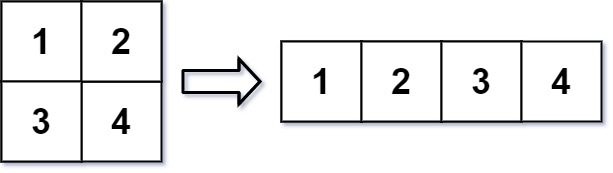
Input: mat = [[1,2],[3,4]], r = 1, c = 4
Output: [[1,2,3,4]]
Example 2:

Input: mat = [[1,2],[3,4]], r = 2, c = 4
Output: [[1,2],[3,4]]
Constraints:
m == mat.lengthn == mat[i].length1 <= m, n <= 100-1000 <= mat[i][j] <= 10001 <= r, c <= 300
Approach Overview
Problem Overview: You receive an m x n matrix and two integers r and c. The task is to reshape the matrix into an r x c matrix while preserving the original row‑major order of elements. If the reshape is impossible (because m * n != r * c), return the original matrix unchanged.
Approach 1: Flatten and Reconstruct (O(m*n) time, O(m*n) space)
The direct strategy is to first flatten the matrix into a 1D list, then rebuild the result matrix with the new dimensions. Iterate through every element of the input matrix row by row and append it to a temporary array. Once flattened, iterate through the array again and fill the new r x c matrix sequentially. This preserves row‑major order automatically. The approach is simple and readable, making it a good first implementation when working with array transformations or quick matrix restructuring tasks. The tradeoff is extra memory for the flattened array.
Approach 2: Index Mirroring (O(m*n) time, O(1) extra space)
A more efficient method avoids creating a temporary array. Treat the matrix as if it were a flattened sequence of length m*n. For each linear index k, compute its original position and its reshaped position using arithmetic. The original coordinates are row = k / n and col = k % n. The new coordinates become newRow = k / c and newCol = k % c. Copy the value directly from the original matrix to the reshaped matrix using these calculated indices. This technique mirrors indices between two matrix layouts and is common in problems involving matrix traversal and coordinate mapping. It achieves the same result while using only the output matrix as additional memory.
Recommended for interviews: Interviewers expect the index mirroring approach because it demonstrates a clear understanding of row‑major ordering and index mapping in a simulation style problem. Starting with the flatten‑and‑reconstruct idea shows you recognize the ordering requirement. Transitioning to index mirroring proves you can remove unnecessary memory and reason about element positions mathematically.
Complexity Analysis
| Approach | Time | Space | When to Use |
|---|---|---|---|
| Flatten and Reconstruct | O(m*n) | O(m*n) | Best for readability and quick implementation when extra memory is acceptable |
| Index Mirroring | O(m*n) | O(1) extra space | Preferred in interviews and memory‑constrained scenarios |