
Read N Characters Given read4 II - Call Multiple Times - Video Solutions
LeetCode 158. Read N Characters Given Read4 II - Call multiple times Explanation and Solution
Read N Characters Given read4 II - Call Multiple Times - Video Solution
Watch 10 video solutions for Read N Characters Given read4 II - Call Multiple Times, a hard level problem involving Array, Simulation, Interactive. This walkthrough by happygirlzt has 6,358 views views. Want to try solving it yourself? Practice on FleetCode or read the detailed text solution.
Problem Statement
Given a file and assume that you can only read the file using a given method read4, implement a method read to read n characters. Your method read may be called multiple times.
Method read4:
The API read4 reads four consecutive characters from file, then writes those characters into the buffer array buf4.
The return value is the number of actual characters read.
Note that read4() has its own file pointer, much like FILE *fp in C.
Definition of read4:
    Parameter:  char[] buf4
    Returns:    int

buf4[] is a destination, not a source. The results from read4 will be copied to buf4[].
Below is a high-level example of how read4 works:
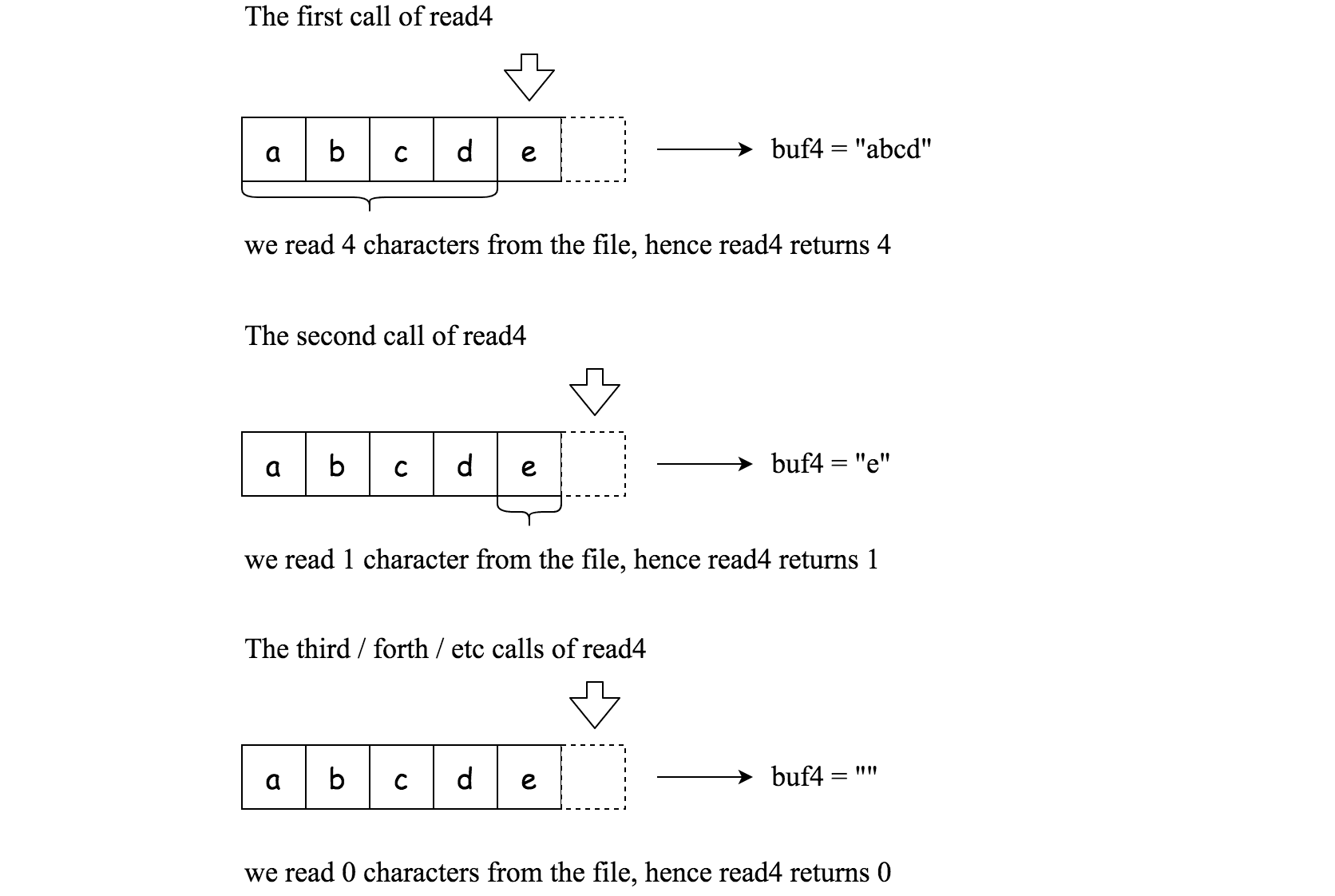
File file("abcde"); // File is "abcde", initially file pointer (fp) points to 'a'
char[] buf4 = new char[4]; // Create buffer with enough space to store characters
read4(buf4); // read4 returns 4. Now buf4 = "abcd", fp points to 'e'
read4(buf4); // read4 returns 1. Now buf4 = "e", fp points to end of file
read4(buf4); // read4 returns 0. Now buf4 = "", fp points to end of file
Method read:
By using the read4 method, implement the method read that reads n characters from file and store it in the buffer array buf. Consider that you cannot manipulate file directly.
The return value is the number of actual characters read.
Definition of read:
    Parameters:	char[] buf, int n
    Returns:	int

buf[] is a destination, not a source. You will need to write the results to buf[].
Note:
- Consider that you cannot manipulate the file directly. The file is only accessible for
read4but not forread. - The read function may be called multiple times.
- Please remember to RESET your class variables declared in Solution, as static/class variables are persisted across multiple test cases. Please see here for more details.
- You may assume the destination buffer array,
buf, is guaranteed to have enough space for storingncharacters. - It is guaranteed that in a given test case the same buffer
bufis called byread.
Example 1:
Input: file = "abc", queries = [1,2,1]
Output: [1,2,0]
Explanation: The test case represents the following scenario:
File file("abc");
Solution sol;
sol.read(buf, 1); // After calling your read method, buf should contain "a". We read a total of 1 character from the file, so return 1.
sol.read(buf, 2); // Now buf should contain "bc". We read a total of 2 characters from the file, so return 2.
sol.read(buf, 1); // We have reached the end of file, no more characters can be read. So return 0.
Assume buf is allocated and guaranteed to have enough space for storing all characters from the file.
Example 2:
Input: file = "abc", queries = [4,1]
Output: [3,0]
Explanation: The test case represents the following scenario:
File file("abc");
Solution sol;
sol.read(buf, 4); // After calling your read method, buf should contain "abc". We read a total of 3 characters from the file, so return 3.
sol.read(buf, 1); // We have reached the end of file, no more characters can be read. So return 0.
Constraints:
1 <= file.length <= 500fileconsist of English letters and digits.1 <= queries.length <= 101 <= queries[i] <= 500
Approach Overview
Problem Overview: Implement read(n) using the provided read4() API, which reads up to 4 characters from a file at a time. The catch: read() may be called multiple times, so leftover characters from previous calls must be preserved.
Approach 1: Stateless read4 Calls (Naive Simulation) (Time: O(n), Space: O(1))
The simplest idea repeatedly calls read4() until n characters are collected or the file ends. Each call copies characters directly into the destination buffer. This works for a single invocation of read(), but it fails when the function is called multiple times because extra characters returned by read4() are discarded instead of saved. The approach demonstrates the mechanics of the read4 API but ignores persistent state across calls.
Approach 2: Persistent Internal Buffer (Optimal Simulation) (Time: O(n), Space: O(1))
The correct solution maintains an internal buffer that stores unused characters returned by read4(). When read(n) is called, you first consume characters from this leftover buffer before requesting more data from read4(). If read4() returns more characters than needed, the extra ones stay in the internal buffer for the next call. This design ensures no characters are lost across calls while still reading the file in chunks of four.
Implementation typically uses a small array of size 4 plus two pointers: one pointer tracks the current read position inside the temporary buffer, and another tracks how many valid characters are stored. When the buffer is exhausted, call read4() again to refill it. The logic becomes a straightforward simulation of file streaming.
This problem mainly tests careful state management and API interaction rather than complex algorithms. The pattern frequently appears in system design scenarios where data arrives in chunks and consumers read arbitrary amounts. It connects closely to array manipulation and simulation techniques, and it is categorized as an interactive style problem because the solution interacts with a provided API.
Recommended for interviews: The persistent buffer approach is what interviewers expect. The naive approach shows you understand how read4() works, but the optimal solution demonstrates correct state handling across multiple function calls.
Complexity Analysis
| Approach | Time | Space | When to Use |
|---|---|---|---|
| Stateless read4 Simulation | O(n) | O(1) | Useful for understanding the read4 API or when read() is guaranteed to be called only once |
| Persistent Internal Buffer | O(n) | O(1) | Required when read() can be called multiple times and leftover characters must be preserved |