
2194. Cells in a Range on an Excel Sheet || Leetcode Weekly Contest 283 || Leetcode 2194
Cells in a Range on an Excel Sheet - Video Solution
Watch 10 video solutions for Cells in a Range on an Excel Sheet, a easy level problem involving String. This walkthrough by Bro Coders has 2,483 views views. Want to try solving it yourself? Practice on FleetCode or read the detailed text solution.
Problem Statement
A cell (r, c) of an excel sheet is represented as a string "<col><row>" where:
<col>denotes the column numbercof the cell. It is represented by alphabetical letters.- For example, the
1stcolumn is denoted by'A', the2ndby'B', the3rdby'C', and so on.
- For example, the
<row>is the row numberrof the cell. Therthrow is represented by the integerr.
You are given a string s in the format "<col1><row1>:<col2><row2>", where <col1> represents the column c1, <row1> represents the row r1, <col2> represents the column c2, and <row2> represents the row r2, such that r1 <= r2 and c1 <= c2.
Return the list of cells (x, y) such that r1 <= x <= r2 and c1 <= y <= c2. The cells should be represented as strings in the format mentioned above and be sorted in non-decreasing order first by columns and then by rows.
Example 1:
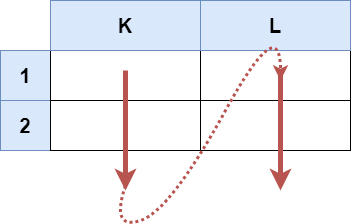
Input: s = "K1:L2"
Output: ["K1","K2","L1","L2"]
Explanation:
The above diagram shows the cells which should be present in the list.
The red arrows denote the order in which the cells should be presented.
Example 2:

Input: s = "A1:F1"
Output: ["A1","B1","C1","D1","E1","F1"]
Explanation:
The above diagram shows the cells which should be present in the list.
The red arrow denotes the order in which the cells should be presented.
Constraints:
s.length == 5'A' <= s[0] <= s[3] <= 'Z''1' <= s[1] <= s[4] <= '9'sconsists of uppercase English letters, digits and':'.
Approach Overview
Problem Overview: The input is a string like "A1:C3" representing a rectangular range on an Excel sheet. You need to return every cell coordinate inside that range in lexicographic order (column first, then row). Each coordinate is formatted like A1, B2, etc.
Approach 1: Iterate through Columns and Rows (Time: O(k), Space: O(1) excluding output)
The range always contains a starting column, starting row, ending column, and ending row. Extract these four values directly from the string. Then iterate column-by-column from the start column to the end column, and inside that loop iterate row-by-row from the start row to the end row. For every pair, construct the coordinate string using the column character and row digit. This works because Excel ranges expand in a simple grid pattern, so a nested loop naturally generates the correct order.
This approach is essentially a small grid traversal. The total work depends on the number of cells in the range (k). Since the problem guarantees single-letter columns and single-digit rows, parsing is constant time and the nested iteration is straightforward. This is the most direct and commonly used solution for problems involving string parsing and simple simulation.
Approach 2: Using Cartesian Product (Time: O(k), Space: O(k))
Another way to view the problem is as a Cartesian product between the column range and the row range. First generate the list of columns (for example A, B, C) and the list of rows (1, 2, 3). Then combine every column with every row to produce the final coordinates. Many languages provide helpers for Cartesian products (such as itertools.product in Python), which makes this approach concise.
The key idea is separating the two dimensions of the grid before combining them. While the time complexity is still O(k), this version often creates intermediate lists for rows and columns, which slightly increases auxiliary memory usage. It is conceptually clean and useful when solving broader combinatorial or grid enumeration problems.
Recommended for interviews: The nested column-row iteration is what interviewers typically expect. It demonstrates clear string parsing and controlled iteration without unnecessary abstractions. The Cartesian product approach is equally correct but may feel like overengineering unless the language provides a very concise helper.
Complexity Analysis
| Approach | Time | Space | When to Use |
|---|---|---|---|
| Iterate through Columns and Rows | O(k) | O(1) | Best general solution. Simple nested loops generate cells directly in lexicographic order. |
| Cartesian Product of Rows and Columns | O(k) | O(k) | Useful when a language provides product utilities or when modeling the grid as two independent sets. |