
Throttle - Leetcode 2676 - JavaScript 30-Day Challenge
Throttle - Video Solution
Watch 5 video solutions for Throttle, a medium level problem. This walkthrough by NeetCodeIO has 7,160 views views. Want to try solving it yourself? Practice on FleetCode or read the detailed text solution.
Problem Statement
Given a function fn and a time in milliseconds t, return a throttled version of that function.
A throttled function is first called without delay and then, for a time interval of t milliseconds, can't be executed but should store the latest function arguments provided to call fn with them after the end of the delay.
For instance, t = 50ms, and the function was called at 30ms, 40ms, and 60ms.
At 30ms, without delay, the throttled function fn should be called with the arguments, and calling the throttled function fn should be blocked for the following t milliseconds.
At 40ms, the function should just save arguments.
At 60ms, arguments should overwrite currently stored arguments from the second call because the second and third calls are made before 80ms. Once the delay has passed, the throttled function fn should be called with the latest arguments provided during the delay period, and it should also create another delay period of 80ms + t.
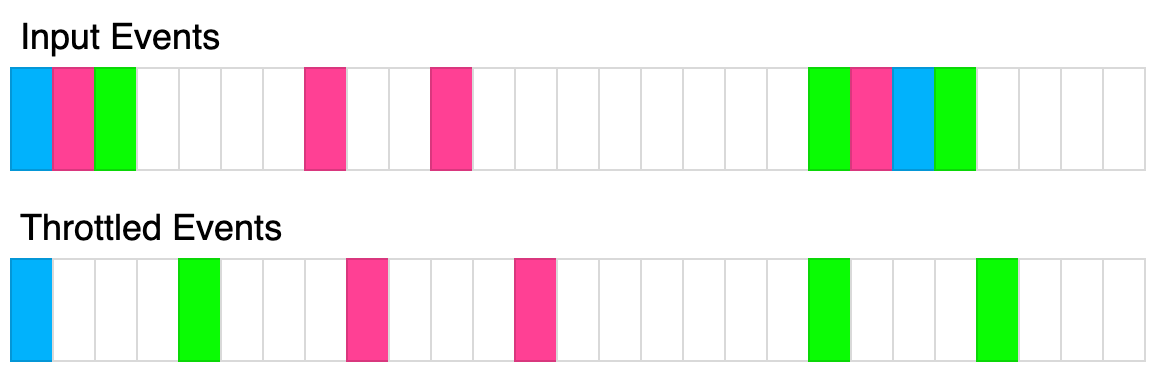 The above diagram shows how throttle will transform events. Each rectangle represents 100ms and the throttle time is 400ms. Each color represents a different set of inputs.
Example 1:
Input:
t = 100,
calls = [
  {"t":20,"inputs":[1]}
]
Output: [{"t":20,"inputs":[1]}]
Explanation: The 1st call is always called without delay
Example 2:
Input:
t = 50,
calls = [
  {"t":50,"inputs":[1]},
  {"t":75,"inputs":[2]}
]
Output: [{"t":50,"inputs":[1]},{"t":100,"inputs":[2]}]
Explanation:
The 1st is called a function with arguments (1) without delay.
The 2nd is called at 75ms, within the delay period because 50ms + 50ms = 100ms, so the next call can be reached at 100ms. Therefore, we save arguments from the 2nd call to use them at the callback of the 1st call.
Example 3:
Input:
t = 70,
calls = [
  {"t":50,"inputs":[1]},
  {"t":75,"inputs":[2]},
  {"t":90,"inputs":[8]},
  {"t": 140, "inputs":[5,7]},
  {"t": 300, "inputs": [9,4]}
]
Output: [{"t":50,"inputs":[1]},{"t":120,"inputs":[8]},{"t":190,"inputs":[5,7]},{"t":300,"inputs":[9,4]}]
Explanation:
The 1st is called a function with arguments (1) without delay.
The 2nd is called at 75ms within the delay period because 50ms + 70ms = 120ms, so it should only save arguments.
The 3rd is also called within the delay period, and because we need just the latest function arguments, we overwrite previous ones. After the delay period, we do a callback at 120ms with saved arguments. That callback makes another delay period of 120ms + 70ms = 190ms so that the next function can be called at 190ms.
The 4th is called at 140ms in the delay period, so it should be called as a callback at 190ms. That will create another delay period of 190ms + 70ms = 260ms.
The 5th is called at 300ms, but it is after 260ms, so it should be called immediately and should create another delay period of 300ms + 70ms = 370ms.
Constraints:
0 <= t <= 10001 <= calls.length <= 100 <= calls[i].t <= 10000 <= calls[i].inputs[j], calls[i].inputs.length <= 10
Approach Overview
Problem Overview: You need to implement a throttle(fn, t) utility. The returned function can be called many times, but fn must execute at most once every t milliseconds. Calls made during the cooldown period should not trigger immediate execution, but the most recent call should run once the throttle window finishes.
Approach 1: Timestamp + Timer Throttling (O(1) time, O(1) space)
The efficient design keeps two pieces of state inside a JavaScript closure: the timestamp of the last execution and a pending timer. When the throttled function is called, compute the remaining cooldown using t - (now - lastExecution). If the remaining time is ≤ 0, execute the function immediately and update the timestamp. If the function is still in the throttle window, store the latest arguments and schedule a timer to run after the remaining delay.
The key insight is that only the latest call during the cooldown matters. Earlier calls inside the window are overwritten by the most recent arguments. When the timer fires, the stored arguments are passed to fn and the execution timestamp is updated. This produces the standard throttle behavior: one immediate call followed by at most one trailing call per interval.
This solution relies on closures and timers from the JavaScript runtime. The closure preserves internal state across invocations without exposing it globally. Every invocation performs only constant-time operations: timestamp calculation, optional timer scheduling, and argument storage.
Approach 2: Queue-Based Scheduling (O(1) amortized time, O(k) space)
Another way to reason about throttling is to push calls into a small queue and process them at fixed intervals using a repeating timer. Each incoming call adds its arguments to the queue, replacing the previous entry so that only the newest invocation remains pending. A periodic timer executes the queued call if one exists.
This model is conceptually simpler for understanding rate limiting and scheduling problems. However, it introduces slightly more state management and requires maintaining an interval lifecycle. In practice, most production implementations prefer the timestamp + timeout strategy because it avoids a constantly running timer and executes only when needed.
Recommended for interviews: The timestamp + timeout implementation is the expected solution. It demonstrates understanding of closures, timer scheduling, and event-loop behavior in JavaScript. Interviewers want to see that you track the last execution time and correctly schedule a trailing call with the latest arguments. Explaining why only the latest call inside the window should run shows solid understanding of design patterns used in real-world throttling utilities.
Complexity Analysis
| Approach | Time | Space | When to Use |
|---|---|---|---|
| Timestamp + Timeout Throttle | O(1) per call | O(1) | Preferred implementation for JavaScript throttling utilities and interviews |
| Queue-Based Interval Processing | O(1) amortized | O(k) | Useful when modeling throttling as a scheduled task processor |