
Find a Peak Element II - Video Solutions
Leetcode 1901 Find a Peak Element II - Implementation using a flavor of binary search
Find a Peak Element II - Video Solution
Watch 8 video solutions for Find a Peak Element II, a medium level problem involving Array, Binary Search, Matrix. This walkthrough by AlgorithmicIQ has 12,745 views views. Want to try solving it yourself? Practice on FleetCode or read the detailed text solution.
Problem Statement
A peak element in a 2D grid is an element that is strictly greater than all of its adjacent neighbors to the left, right, top, and bottom.
Given a 0-indexed m x n matrix mat where no two adjacent cells are equal, find any peak element mat[i][j] and return the length 2 array [i,j].
You may assume that the entire matrix is surrounded by an outer perimeter with the value -1 in each cell.
You must write an algorithm that runs in O(m log(n)) or O(n log(m)) time.
Example 1:
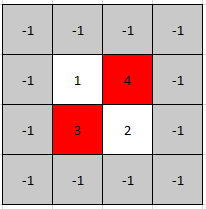
Input: mat = [[1,4],[3,2]]
Output: [0,1]
Explanation: Both 3 and 4 are peak elements so [1,0] and [0,1] are both acceptable answers.
Example 2:
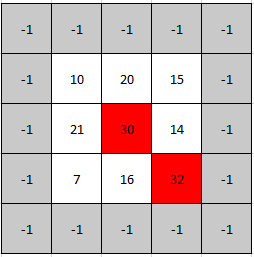
Input: mat = [[10,20,15],[21,30,14],[7,16,32]]
Output: [1,1]
Explanation: Both 30 and 32 are peak elements so [1,1] and [2,2] are both acceptable answers.
Constraints:
m == mat.lengthn == mat[i].length1 <= m, n <= 5001 <= mat[i][j] <= 105- No two adjacent cells are equal.
Approach Overview
Problem Overview: You are given an array in the form of a 2D grid. A peak element is a cell strictly greater than its up, down, left, and right neighbors. The task is to return the position of any such peak in the matrix.
Approach 1: Brute Force Scan (O(m * n) time, O(1) space)
The most direct solution checks every cell in the grid. For each position (r, c), compare the value with its four neighbors if they exist. If the current cell is greater than all valid neighbors, you found a peak and can return immediately. This approach uses simple iteration over the matrix and constant extra space. It works for all cases but becomes inefficient when the matrix is large because every element may need to be inspected.
Approach 2: Binary Search on Columns (O(m log n) time, O(1) space)
This approach applies binary search across columns instead of scanning the whole grid. Pick the middle column and find the row containing the maximum value in that column by iterating through all rows. Compare this value with its left and right neighbors. If it is greater than both, you found a peak. If the right neighbor is larger, move the search to the right half of the matrix; if the left neighbor is larger, move left. Each step halves the search space across columns while scanning only one column. The key insight is that moving toward the larger neighbor guarantees a peak exists in that direction.
Approach 3: Binary Search on Rows (O(n log m) time, O(1) space)
This variation performs binary search across rows instead of columns. Select the middle row, then find the column containing the maximum value within that row. Compare this value with the cells above and below it. If it is greater than both vertical neighbors, it forms a peak. Otherwise move the search upward or downward depending on which neighbor is larger. This method mirrors the column-based strategy and works well when the number of columns is significantly larger than rows.
Recommended for interviews: Binary search on columns is the most common solution interviewers expect for problems involving a matrix peak search. It reduces the search space logarithmically while scanning only one column each step, giving O(m log n) time. Starting with a brute force explanation shows you understand the definition of a peak, but transitioning to binary search demonstrates algorithmic optimization and familiarity with 2D search patterns.
Complexity Analysis
| Approach | Time | Space | When to Use |
|---|---|---|---|
| Brute Force Scan | O(m * n) | O(1) | Good for understanding the peak definition or when matrix size is small |
| Binary Search on Columns | O(m log n) | O(1) | Best general solution for large matrices; reduces search space by half each step |
| Binary Search on Rows | O(n log m) | O(1) | Useful when rows are fewer than columns or when row scanning is cheaper |