Rotate Image solution and explanation
 IBM
IBM Cisco
Cisco Mastercard
 Infosys
9 more videos on this problem
 Rotate Image - Matrix - Leetcode 48NeetCode · 15:46 · 322K views
 LeetCode 48. Rotate Image (Solution Explained)Nick White · 10:18 · 89K views
 Rotate Image - Leetcode 48 - Arrays & Strings (Python)Greg Hogg · 5:27 · 32K views
 Rotate Image (Leetcode 48) | Full solution with examples visuals and animation | Study AlgorithmsNikhil Lohia · 14:55 · 29K views
 Rotate Image | Simplest Explanation | Detailed | Leetcode 48 | codestorywithMIKcodestorywithMIK · 9:31 · 25K views
 LeetCode 48: Rotate Image | Rotate N*N Matrix | Rotate a Square - Interview Prep Ep 54Fisher Coder · 33:28 · 9K views
 Rotate Image - LeetCode 48 - JavaScriptAlgoJS · 6:28 · 2K views
 Rotate Image - leetcode 48Algorial · 7:12 · 1K views
 48. Rotate Image Leetcode Problem | Solution with Explanation | DSA Problem SeriesCoding Blocks · 6:22 · 599 views
 Rotate Matrix/Image by 90 Degrees | Brute - Optimaltake U forward · 17:47 · 554K views
The problem
You are given an n x n 2D matrix representing an image, rotate the image by 90 degrees (clockwise).
You have to rotate the image in-place, which means you have to modify the input 2D matrix directly. DO NOT allocate another 2D matrix and do the rotation.
Example 1:
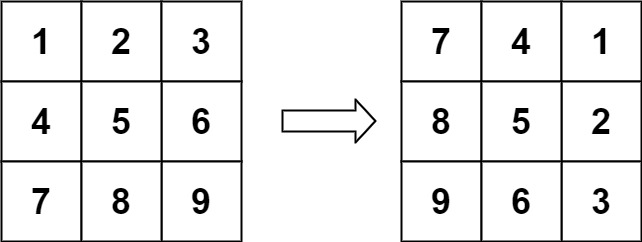
Input: matrix = [[1,2,3],[4,5,6],[7,8,9]]
Output: [[7,4,1],[8,5,2],[9,6,3]]
Example 2:
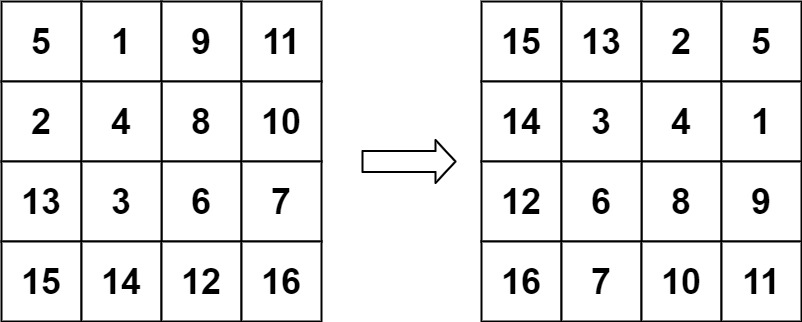
Input: matrix = [[5,1,9,11],[2,4,8,10],[13,3,6,7],[15,14,12,16]]
Output: [[15,13,2,5],[14,3,4,1],[12,6,8,9],[16,7,10,11]]
Constraints:
n == matrix.length == matrix[i].length1 <= n <= 20-1000 <= matrix[i][j] <= 1000
Approach overview
Problem Overview: You are given an n x n matrix representing an image. The task is to rotate the matrix 90 degrees clockwise in-place. No extra matrix is allowed, so every value must be repositioned within the same structure.
The problem is essentially a coordinate transformation inside a square matrix. A value at position (r, c) moves to (c, n - 1 - r) after a 90° clockwise rotation. Implementing this efficiently requires rearranging elements without overwriting values.
Approach 1: Transpose and Reverse (O(n²) time, O(1) space)
This method breaks rotation into two deterministic operations on the array-backed matrix. First, transpose the matrix by swapping matrix[i][j] with matrix[j][i] for all i < j. Transposition flips the matrix along its main diagonal, converting rows into columns. After that, reverse each row of the matrix. Reversing the rows shifts elements to their final rotated positions. Both steps iterate through the matrix once, resulting in O(n²) time while keeping space usage O(1) because swaps happen in-place.
The key insight is recognizing that a clockwise rotation equals transpose + horizontal reflection. This approach is clean, easy to implement, and avoids complex index calculations.
Approach 2: Layer by Layer Rotation (O(n²) time, O(1) space)
This approach treats the matrix like concentric square layers. Start from the outer layer and move inward. For each layer, iterate through the elements along the top edge and rotate four corresponding positions at a time: top → right → bottom → left → top. Each iteration performs a four-way swap using a temporary variable.
For example, an element at the top row moves to the right column, the right column moves to the bottom row, the bottom row moves to the left column, and the left column moves back to the top. The process repeats for every element in the current layer before moving inward. Since every element is moved exactly once, the total runtime remains O(n²) with constant O(1) space.
This method relies heavily on index arithmetic and understanding how coordinates shift during rotation. It directly simulates the geometric rotation rather than decomposing it into matrix operations.
Recommended for interviews: The transpose-and-reverse approach is usually what interviewers expect because it demonstrates pattern recognition in matrix transformations. The layer-by-layer method shows deeper understanding of index manipulation and in-place rotation mechanics. Knowing both helps you explain the math behind the transformation and implement the cleaner solution quickly.
Approach 1: Transpose and Reverse
This approach utilizes two main operations. First, we transpose the matrix, which means flipping it over its diagonal. In other words, swap matrix[i][j] with matrix[j][i]. After transposing the matrix, we reverse each row. This combination results in a 90-degree clockwise rotation.
def rotate(matrix):
    n = len(matrix)
    for i in range(n):
        for j in range(i, n):
            matrix[i][j], matrix[j][i] = matrix[j][i], matrix[i][j]
    for i in range(n):
        matrix[i].reverse()

if __name__ == "__main__":
    matrix = [[1, 2, 3], [4, 5, 6], [7, 8, 9]]
    rotate(matrix)
    for row in matrix:
print(row)import java.util.Arrays;
class Solution {
public void rotate(int[][] matrix) {
int n = matrix.length;
for (int i = 0; i < n; i++) {
for (int j = i; j < n; j++) {
int temp = matrix[i][j];
matrix[i][j] = matrix[j][i];
matrix[j][i] = temp;
}
}
for (int i = 0; i < n; i++) {
for (int j = 0; j < n / 2; j++) {
int temp = matrix[i][j];
matrix[i][j] = matrix[i][n - j - 1];
matrix[i][n - j - 1] = temp;
}
}
}
public static void main(String[] args) {
Solution sol = new Solution();
int[][] matrix = {{1, 2, 3}, {4, 5, 6}, {7, 8, 9}};
sol.rotate(matrix);
for (int[] row : matrix) {
System.out.println(Arrays.toString(row));
}
}
}#include <vector>
#include <iostream>
using namespace std;
void rotate(vector<vector<int>>& matrix) {
int n = matrix.size();
for (int i = 0; i < n; i++) {
for (int j = i; j < n; j++) {
swap(matrix[i][j], matrix[j][i]);
}
}
for (int i = 0; i < n; i++) {
reverse(matrix[i].begin(), matrix[i].end());
}
}
int main() {
vector<vector<int>> matrix = {{1, 2, 3}, {4, 5, 6}, {7, 8, 9}};
rotate(matrix);
for (auto& row : matrix) {
for (int num : row) {
cout << num << " ";
}
cout << endl;
}
return 0;
}function rotate(matrix) {
const n = matrix.length;
for (let i = 0; i < n; i++) {
for (let j = i; j < n; j++) {
[matrix[i][j], matrix[j][i]] = [matrix[j][i], matrix[i][j]];
}
}
for (let i = 0; i < n; i++) {
matrix[i].reverse();
}
}
const matrix = [
[1, 2, 3],
[4, 5, 6],
[7, 8, 9]
];
rotate(matrix);
console.log(matrix);#include <stdio.h>
void rotate(int matrix[][3], int n) {
for (int i = 0; i < n; i++) {
for (int j = i; j < n; j++) {
int temp = matrix[i][j];
matrix[i][j] = matrix[j][i];
matrix[j][i] = temp;
}
}
for (int i = 0; i < n; i++) {
for (int j = 0; j < n/2; j++) {
int temp = matrix[i][j];
matrix[i][j] = matrix[i][n-j-1];
matrix[i][n-j-1] = temp;
}
}
}
int main() {
int matrix[3][3] = {{1, 2, 3}, {4, 5, 6}, {7, 8, 9}};
rotate(matrix, 3);
for (int i = 0; i < 3; i++) {
for (int j = 0; j < 3; j++) {
printf("%d ", matrix[i][j]);
}
printf("\n");
}
return 0;
}using System;
public class Solution {
public void Rotate(int[][] matrix) {
int n = matrix.Length;
for (int i = 0; i < n; i++) {
for (int j = i; j < n; j++) {
int temp = matrix[i][j];
matrix[i][j] = matrix[j][i];
matrix[j][i] = temp;
}
}
for (int i = 0; i < n; i++) {
Array.Reverse(matrix[i]);
}
}
public static void Main(string[] args) {
int[][] matrix = new int[3][] {
new int[] {1, 2, 3},
new int[] {4, 5, 6},
new int[] {7, 8, 9}
};
Solution sol = new Solution();
sol.Rotate(matrix);
foreach (var row in matrix) {
Console.WriteLine(string.Join(", ", row));
}
}
}Transpose the matrix by swapping elements across the diagonal, followed by reversing each row in place using the built-in reverse method in Python.
Time Complexity: O(n^2) - Due to the nested loop structure.
Space Complexity: O(1) - The entire operation is in-place.
Approach 2: Layer by Layer Rotation
This approach rotates the matrix layer by layer or ring by ring. Start from the outer layer and move to the inner layer, rotating elements by moving them in groups of four. This involves swapping the elements in four-step rotations.
def rotate(matrix):
    n = len(matrix)
    for layer in range(n // 2):
        first, last = layer, n - layer - 1
        for i in range(first, last):
            offset = i - first
            top = matrix[first][i]
            matrix[first][i] = matrix[last - offset][first]
            matrix[last - offset][first] = matrix[last][last - offset]
            matrix[last][last - offset] = matrix[i][last]
            matrix[i][last] = top

if __name__ == "__main__":
    matrix = [[1, 2, 3], [4, 5, 6], [7, 8, 9]]
    rotate(matrix)
    for row in matrix:
print(row)class Solution {
public void rotate(int[][] matrix) {
int n = matrix.length;
for (int layer = 0; layer < n / 2; layer++) {
int first = layer;
int last = n - 1 - layer;
for (int i = first; i < last; i++) {
int offset = i - first;
int top = matrix[first][i];
matrix[first][i] = matrix[last - offset][first];
matrix[last - offset][first] = matrix[last][last - offset];
matrix[last][last - offset] = matrix[i][last];
matrix[i][last] = top;
}
}
}
public static void main(String[] args) {
Solution sol = new Solution();
int[][] matrix = {{1, 2, 3}, {4, 5, 6}, {7, 8, 9}};
sol.rotate(matrix);
for (int[] row : matrix) {
System.out.println(java.util.Arrays.toString(row));
}
}
}#include <vector>
#include <iostream>
using namespace std;
void rotate(vector<vector<int>>& matrix) {
int n = matrix.size();
for (int layer = 0; layer < n / 2; layer++) {
int first = layer;
int last = n - 1 - layer;
for (int i = first; i < last; i++) {
int offset = i - first;
int top = matrix[first][i];
matrix[first][i] = matrix[last - offset][first];
matrix[last - offset][first] = matrix[last][last - offset];
matrix[last][last - offset] = matrix[i][last];
matrix[i][last] = top;
}
}
}
int main() {
vector<vector<int>> matrix = {{1, 2, 3}, {4, 5, 6}, {7, 8, 9}};
rotate(matrix);
for (auto& row : matrix) {
for (int num : row) {
cout << num << " ";
}
cout << endl;
}
return 0;
}function rotate(matrix) {
const n = matrix.length;
for (let layer = 0; layer < n / 2; layer++) {
let first = layer;
let last = n - 1 - layer;
for (let i = first; i < last; i++) {
let offset = i - first;
let top = matrix[first][i];
matrix[first][i] = matrix[last - offset][first];
matrix[last - offset][first] = matrix[last][last - offset];
matrix[last][last - offset] = matrix[i][last];
matrix[i][last] = top;
}
}
}
const matrix = [
[1, 2, 3],
[4, 5, 6],
[7, 8, 9]
];
rotate(matrix);
console.log(matrix);#include <stdio.h>
void rotate(int matrix[][3], int n) {
for (int layer = 0; layer < n / 2; layer++) {
int first = layer;
int last = n - layer - 1;
for (int i = first; i < last; i++) {
int offset = i - first;
int top = matrix[first][i];
matrix[first][i] = matrix[last - offset][first];
matrix[last - offset][first] = matrix[last][last - offset];
matrix[last][last - offset] = matrix[i][last];
matrix[i][last] = top;
}
}
}
int main() {
int matrix[3][3] = {{1, 2, 3}, {4, 5, 6}, {7, 8, 9}};
rotate(matrix, 3);
for (int i = 0; i < 3; i++) {
for (int j = 0; j < 3; j++) {
printf("%d ", matrix[i][j]);
}
printf("\n");
}
return 0;
}using System;
public class Solution {
public void Rotate(int[][] matrix) {
int n = matrix.Length;
for (int layer = 0; layer < n / 2; layer++) {
int first = layer;
int last = n - 1 - layer;
for (int i = first; i < last; i++) {
int offset = i - first;
int top = matrix[first][i];
matrix[first][i] = matrix[last - offset][first];
matrix[last - offset][first] = matrix[last][last - offset];
matrix[last][last - offset] = matrix[i][last];
matrix[i][last] = top;
}
}
}
public static void Main(string[] args) {
int[][] matrix = new int[3][] {
new int[] {1, 2, 3},
new int[] {4, 5, 6},
new int[] {7, 8, 9}
};
Solution sol = new Solution();
sol.Rotate(matrix);
foreach (var row in matrix) {
Console.WriteLine(string.Join(", ", row));
}
}
}This Python code rotates the matrix by processing each layer starting from the outside towards the center, applying a four-way swap.
Time Complexity: O(n^2) - Iterates through each element to perform swaps.
Space Complexity: O(1) - Rotation is performed in place.
Approach 3: In-place Rotation
According to the problem requirements, we need to rotate matrix[i][j] to matrix[j][n - i - 1].
We can first flip the matrix upside down, i.e., swap matrix[i][j] with matrix[n - i - 1][j], and then flip the matrix along the main diagonal, i.e., swap matrix[i][j] with matrix[j][i]. This way, we can rotate matrix[i][j] to matrix[j][n - i - 1].
The time complexity is O(n^2), where n is the side length of the matrix. The space complexity is O(1).
/**
 Do not return anything, modify matrix in-place instead.
 */
function rotate(matrix: number[][]): void {
    matrix.reverse();
    for (let i = 0; i < matrix.length; ++i) {
        for (let j = 0; j < i; ++j) {
            const t = matrix[i][j];
            matrix[i][j] = matrix[j][i];
            matrix[j][i] = t;
        }
    }
}func rotate(matrix [][]int) {
n := len(matrix)
for i := 0; i < n>>1; i++ {
for j := 0; j < n; j++ {
matrix[i][j], matrix[n-i-1][j] = matrix[n-i-1][j], matrix[i][j]
}
}
for i := 0; i < n; i++ {
for j := 0; j < i; j++ {
matrix[i][j], matrix[j][i] = matrix[j][i], matrix[i][j]
}
}
}impl Solution {
pub fn rotate(matrix: &mut Vec<Vec<i32>>) {
let n = matrix.len();
for i in 0..n / 2 {
for j in 0..n {
let t = matrix[i][j];
matrix[i][j] = matrix[n - i - 1][j];
matrix[n - i - 1][j] = t;
}
}
for i in 0..n {
for j in 0..i {
let t = matrix[i][j];
matrix[i][j] = matrix[j][i];
matrix[j][i] = t;
}
}
}
}Complexity comparison
| Approach | Complexity |
|---|---|
| Transpose and Reverse | Time Complexity: O(n^2) - Due to the nested loop structure. |
| Layer by Layer Rotation | Time Complexity: O(n^2) - Iterates through each element to perform swaps. |
| In-place Rotation | – |
Complexity analysis
| Approach | Time | Space | When to Use |
|---|---|---|---|
| Transpose and Reverse | O(n^2) | O(1) | Best general approach; simple implementation and commonly expected in interviews |
| Layer by Layer Rotation | O(n^2) | O(1) | Useful when demonstrating in-place coordinate rotation and understanding matrix layers |
Frequently asked questions
Is Rotate Image easy or hard?
Rotate Image is classified as a medium difficulty problem. The implementation itself is short, but recognizing the transpose-and-reverse pattern or correctly handling layer rotations requires solid understanding of matrix transformations.
Rotate Image Python/Java solution
Python and Java solutions typically implement either transpose plus row reversal or a layer-by-layer four-way swap. Both versions run in O(n^2) time with O(1) extra space because all modifications happen directly inside the original matrix.
How to solve Rotate Image in O(n^2)?
Perform an in-place transformation using two steps: transpose the matrix across the main diagonal, then reverse every row. The transpose step swaps elements across the diagonal and the reverse step shifts them to their rotated positions, giving a correct 90° clockwise rotation in O(n^2) time.
What is the best approach for Rotate Image?
The transpose and reverse method is the most common solution. First transpose the n x n matrix by swapping matrix[i][j] with matrix[j][i], then reverse each row. This performs the 90-degree clockwise rotation in O(n^2) time with O(1) extra space and keeps the implementation simple.
Is Rotate Image asked at Google/Amazon/Meta?
Rotate Image frequently appears in interviews at companies such as Google, Amazon, Meta, and Microsoft. It tests matrix manipulation, in-place transformations, and understanding of coordinate mapping within 2D arrays.
What data structure is used in Rotate Image?
The problem uses a 2D array (matrix). The algorithm focuses on manipulating indices inside the matrix, performing swaps or four-way rotations without allocating another matrix.
What is the time complexity of Rotate Image?
Rotating an n x n matrix requires visiting each element at least once, so the time complexity is O(n^2). Both the transpose-and-reverse approach and the layer-by-layer rotation approach operate within this bound while using O(1) extra space.