
Debounce - Solution & Explanation
Problem Statement
Given a function fn and a time in milliseconds t, return a debounced version of that function.
A debounced function is a function whose execution is delayed by t milliseconds and whose execution is cancelled if it is called again within that window of time. The debounced function should also receive the passed parameters.
For example, let's say t = 50ms, and the function was called at 30ms, 60ms, and 100ms.
The first 2 function calls would be cancelled, and the 3rd function call would be executed at 150ms.
If instead t = 35ms, The 1st call would be cancelled, the 2nd would be executed at 95ms, and the 3rd would be executed at 135ms.
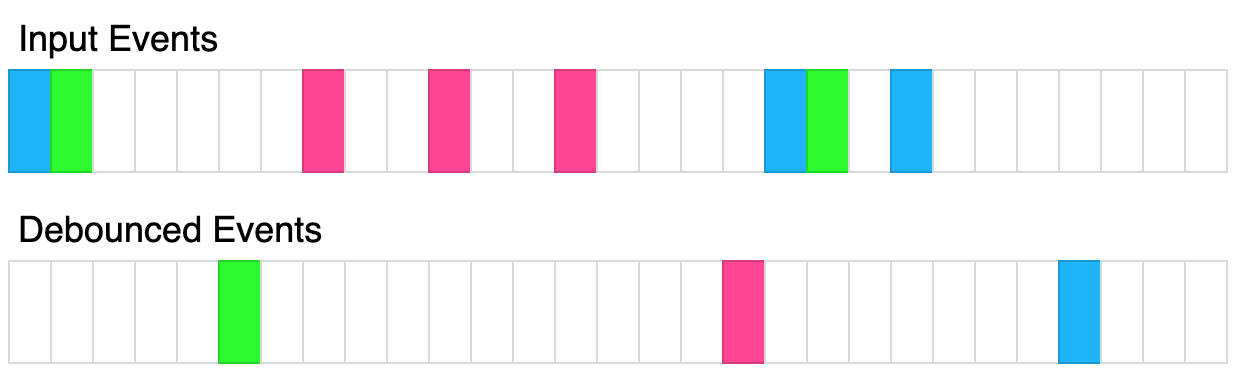
The above diagram shows how debounce will transform events. Each rectangle represents 100ms and the debounce time is 400ms. Each color represents a different set of inputs.
Please solve it without using lodash's _.debounce() function.
Example 1:
Input:
t = 50
calls = [
  {"t": 50, inputs: [1]},
  {"t": 75, inputs: [2]}
]
Output: [{"t": 125, inputs: [2]}]
Explanation:
let start = Date.now();
function log(...inputs) {
  console.log([Date.now() - start, inputs ])
}
const dlog = debounce(log, 50);
setTimeout(() => dlog(1), 50);
setTimeout(() => dlog(2), 75);

The 1st call is cancelled by the 2nd call because the 2nd call occurred before 100ms
The 2nd call is delayed by 50ms and executed at 125ms. The inputs were (2).
Example 2:
Input:
t = 20
calls = [
  {"t": 50, inputs: [1]},
  {"t": 100, inputs: [2]}
]
Output: [{"t": 70, inputs: [1]}, {"t": 120, inputs: [2]}]
Explanation:
The 1st call is delayed until 70ms. The inputs were (1).
The 2nd call is delayed until 120ms. The inputs were (2).
Example 3:
Input:
t = 150
calls = [
  {"t": 50, inputs: [1, 2]},
  {"t": 300, inputs: [3, 4]},
  {"t": 300, inputs: [5, 6]}
]
Output: [{"t": 200, inputs: [1,2]}, {"t": 450, inputs: [5, 6]}]
Explanation:
The 1st call is delayed by 150ms and ran at 200ms. The inputs were (1, 2).
The 2nd call is cancelled by the 3rd call
The 3rd call is delayed by 150ms and ran at 450ms. The inputs were (5, 6).
Constraints:
0 <= t <= 10001 <= calls.length <= 100 <= calls[i].t <= 10000 <= calls[i].inputs.length <= 10
Approach Overview
Problem Overview: Implement a debounce utility that delays the execution of a function until a specified time has passed since the last call. Every new call resets the delay, ensuring the wrapped function only runs after activity stops.
Approach 1: Using Timers for Debouncing (O(1) time per call, O(1) space)
The core idea of debouncing is controlling execution with a timer. Each time the returned function is called, you cancel the previous scheduled execution using clearTimeout and start a new timer with setTimeout. If calls keep happening before the delay expires, the timer keeps resetting and the original function never runs. Once calls stop for the full delay period, the timer finally triggers and executes the function with the latest arguments. This approach relies on JavaScript runtime timers and is the most common implementation used in UI event handling like search inputs or resize events.
Approach 2: Using a Closure to Manage State (O(1) time per call, O(1) space)
This implementation focuses on how the timer state is preserved across function calls. A closure stores the timer ID in the outer scope of the returned function. Each invocation accesses that shared variable, allowing it to cancel the previously scheduled execution before scheduling a new one. The closure guarantees that the timer persists between calls without using global variables. This pattern is a practical example of state management using closures in JavaScript, and it appears frequently in functional programming utilities.
Recommended for interviews: The closure-based debounce implementation is what interviewers expect. Understanding how the timer is stored and reset demonstrates knowledge of asynchronous behavior, closures, and JavaScript execution context. Explaining the timer-only concept first shows you understand the problem intuitively, while implementing it with a closure shows you can manage persistent state cleanly.
Approach 1: Using Timers for Debouncing
This approach involves using a timeout mechanism to delay the execution of the function by t milliseconds. If the function is called again within this delay period, the existing delay is cancelled and a new delay is started. This ensures that the function execution occurs only after the last call within the time window has passed.
The JavaScript implementation utilizes the setTimeout function to delay execution of fn by t milliseconds. If fn is called again before this delay expires, clearTimeout is used to cancel the previous delay and initiate a new one. This ensures that only the last call within the debounce window is eventually executed.
Code
JavaScript
Complexity
Time Complexity: O(1) per function call as we only set and clear timeouts.
Space Complexity: O(1) as we are only storing the timer id.
Approach 2: Using a Closure to Manage State
This approach takes advantage of closures to maintain the state of the timeout. This allows us to track whether a timeout is active and reset it if needed. This encapsulation within the closure ensures that each debounced function call properly manages the delay on its own.
In this JavaScript solution, a closure is created around a timerId variable that keeps track of the current timeout. Each invocation of the debounced function checks this variable; if a timeout is active, it is cleared before setting a new one. This method leverages closures to effectively manage state across function invocations.
Code
JavaScript
Complexity
Time Complexity: O(1) per function call because managing a single timeout involves constant-time operations.
Space Complexity: O(1) due to the single timerId variable maintained per debounced instance.
Approach 3: Default Approach
Code
TypeScript
Complexity Comparison
| Approach | Complexity |
|---|---|
| Using Timers for Debouncing | Time Complexity: O(1) per function call as we only set and clear timeouts. |
| Using a Closure to Manage State | Time Complexity: O(1) per function call because managing a single timeout involves constant-time operations. |
| Default Approach | — |
Detailed Complexity Analysis
| Approach | Time | Space | When to Use |
|---|---|---|---|
| Using Timers for Debouncing | O(1) per call | O(1) | When implementing debounce behavior for events like typing, scrolling, or resizing |
| Using Closure to Manage State | O(1) per call | O(1) | Preferred interview implementation where the timer must persist across function calls |
Video Solution
Debounce - Leetcode 2627 - JavaScript 30-Day Challenge • NeetCodeIO • 12,783 views views
Watch 9 more video solutions →Frequently Asked Questions
Is Debounce easy or hard?
Debounce Python/Java solution
How to solve Debounce in O(1)?
What is the best approach for Debounce?
Is Debounce asked at Google/Amazon/Meta?
What data structure is used in Debounce?
What is the time complexity of Debounce?
Ready to solve this problem?
Practice Debounce with our built-in code editor and test cases.
Practice on FleetCode