
You are given an image represented by an m x n grid of integers image, where image[i][j] represents the pixel value of the image. You are also given three integers sr, sc, and color. Your task is to perform a flood fill on the image starting from the pixel image[sr][sc].
To perform a flood fill:
color.Return the modified image after performing the flood fill.
Example 1:
Input: image = [[1,1,1],[1,1,0],[1,0,1]], sr = 1, sc = 1, color = 2
Output: [[2,2,2],[2,2,0],[2,0,1]]
Explanation:
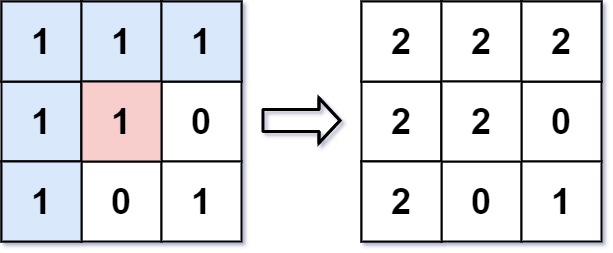
From the center of the image with position (sr, sc) = (1, 1) (i.e., the red pixel), all pixels connected by a path of the same color as the starting pixel (i.e., the blue pixels) are colored with the new color.
Note the bottom corner is not colored 2, because it is not horizontally or vertically connected to the starting pixel.
Example 2:
Input: image = [[0,0,0],[0,0,0]], sr = 0, sc = 0, color = 0
Output: [[0,0,0],[0,0,0]]
Explanation:
The starting pixel is already colored with 0, which is the same as the target color. Therefore, no changes are made to the image.
Constraints:
m == image.lengthn == image[i].length1 <= m, n <= 500 <= image[i][j], color < 2160 <= sr < m0 <= sc < nThe Flood Fill problem involves recoloring a connected region in a 2D grid starting from a given cell. The key idea is to replace the starting pixel's color and then propagate the change to all adjacent cells (up, down, left, right) that share the same original color.
A common approach is to treat the grid as a graph and perform either a Depth-First Search (DFS) or Breadth-First Search (BFS). Starting from the given pixel, explore its neighbors recursively (DFS) or iteratively using a queue (BFS). Only continue traversal if the neighbor lies within bounds and has the same initial color as the starting pixel. This ensures the fill spreads only across the intended connected component.
Before starting the traversal, it is helpful to store the original color to avoid unnecessary processing, especially when the new color matches the existing one. Both DFS and BFS approaches visit each cell at most once, resulting in O(m × n) time complexity for an m × n grid.
| Approach | Time Complexity | Space Complexity |
|---|---|---|
| Depth-First Search (DFS) | O(m × n) | O(m × n) worst case recursion stack |
| Breadth-First Search (BFS) | O(m × n) | O(m × n) for queue storage |
take U forward
Use these hints if you're stuck. Try solving on your own first.
Write a recursive function that paints the pixel if it's the correct color, then recurses on neighboring pixels.
This approach uses recursion to explore all connected pixels that need to be updated. Starting from the initial pixel, you recursively attempt to update all four possible directions (up, down, left, right) whenever the neighboring pixel has the same original color.
The recursion ensures that all connected and valid pixels are eventually updated. Make sure to handle the base case where the function stops if the pixel is out of bounds or if it doesn't need updating (either because it's already updated or has a different color).
Time Complexity: O(m * n) because in the worst case, all of the pixels will be connected and thus changed.
Space Complexity: O(m * n) due to the recursion call stack.
1#include <stdio.h>
2
3void dfs(int** image, int m, int n, int r, int c, int originalColor, int newColor
This C solution implements DFS similarly to the Python version but requires direct pointer manipulations and array index bounds checking.
This approach employs an iterative breadth-first search (BFS) using a queue. Starting from the initial pixel, we enqueue it and begin the BFS process, updating connected pixels of the same original color to the new color.
For each pixel, check its adjacent pixels and enqueue them if they are valid and of the original color. This continues until the queue is empty, ensuring all pixels are updated appropriately.
Time Complexity: O(m * n), where m and n are the dimensions of the image (same as DFS).
Space Complexity: O(m * n), as we may store all pixels in the queue in the worst-case scenario.
public class Solution {
    public int[][] FloodFill(int[][] image, int sr, int sc, int newColor) {
        int originalColor = image[sr][sc];
        if (originalColor == newColor) return image;

        int rows = image.Length;
        int cols = image[0].Length;
        Queue<(int, int)> queue = new Queue<(int, int)>();
        queue.Enqueue((sr, sc));

        int[][] directions = new int[][] { new int[] {1, 0}, new int[] {-1, 0}, new int[] {0, 1}, new int[] {0, -1} };

        while (queue.Count > 0) {
            var (r, c) = queue.Dequeue();
            if (image[r][c] == originalColor) {
                image[r][c] = newColor;
                foreach (var d in directions) {
                    int rr = r + d[0], cc = c + d[1];
                    if (rr >= 0 && rr < rows && cc >= 0 && cc < cols && image[rr][cc] == originalColor) {
                        queue.Enqueue((rr, cc));
                    }
                }
            }
        }

        return image;
    }
}Watch expert explanations and walkthroughs
Practice problems asked by these companies to ace your technical interviews.
Explore More ProblemsJot down your thoughts, approach, and key learnings
Yes, Flood Fill is a common beginner-level graph and matrix traversal problem. It helps interviewers evaluate understanding of DFS, BFS, recursion, boundary checks, and grid-based traversal.
The optimal approach uses graph traversal such as Depth-First Search (DFS) or Breadth-First Search (BFS). Starting from the given pixel, you explore all connected cells with the same original color and recolor them while ensuring each cell is processed only once.
Storing the original color helps ensure that only cells belonging to the same connected component are recolored. It also prevents infinite loops when the new color is the same as the starting pixel's color.
A recursion stack works well for the DFS approach, while a queue is used for the BFS approach. Both methods treat the grid as a graph and efficiently traverse neighboring cells in four directions.
The C# implementation employs a Queue for the BFS logic, exploring and updating pixels iteratively. It checks each adjacent pixel and enqueues eligible pixels until all are processed.