Given a function fn and a time in milliseconds t, return a debounced version of that function.
A debounced function is a function whose execution is delayed by t milliseconds and whose execution is cancelled if it is called again within that window of time. The debounced function should also receive the passed parameters.
For example, let's say t = 50ms, and the function was called at 30ms, 60ms, and 100ms.
The first 2 function calls would be cancelled, and the 3rd function call would be executed at 150ms.
If instead t = 35ms, The 1st call would be cancelled, the 2nd would be executed at 95ms, and the 3rd would be executed at 135ms.
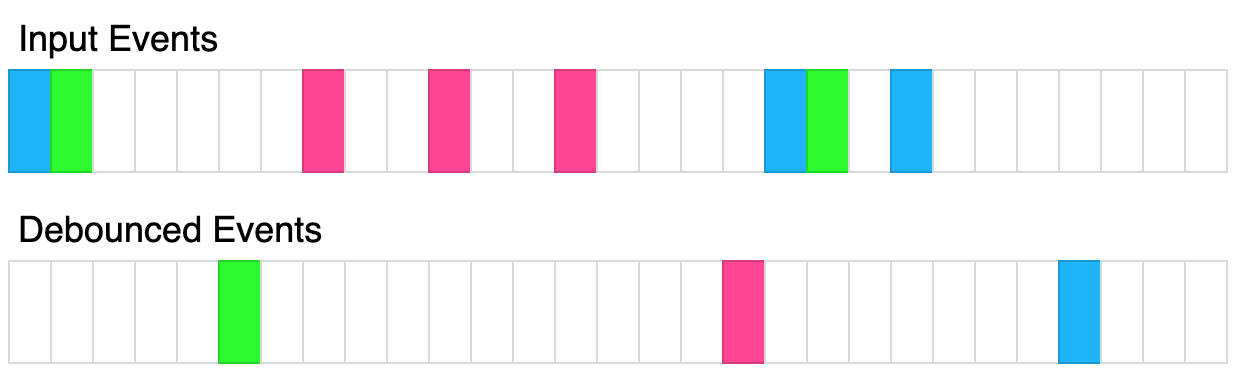
The above diagram shows how debounce will transform events. Each rectangle represents 100ms and the debounce time is 400ms. Each color represents a different set of inputs.
Please solve it without using lodash's _.debounce() function.
Example 1:
Input:
t = 50
calls = [
  {"t": 50, inputs: [1]},
  {"t": 75, inputs: [2]}
]
Output: [{"t": 125, inputs: [2]}]
Explanation:
let start = Date.now();
function log(...inputs) {
  console.log([Date.now() - start, inputs ])
}
const dlog = debounce(log, 50);
setTimeout(() => dlog(1), 50);
setTimeout(() => dlog(2), 75);

The 1st call is cancelled by the 2nd call because the 2nd call occurred before 100ms
The 2nd call is delayed by 50ms and executed at 125ms. The inputs were (2).
Example 2:
Input:
t = 20
calls = [
  {"t": 50, inputs: [1]},
  {"t": 100, inputs: [2]}
]
Output: [{"t": 70, inputs: [1]}, {"t": 120, inputs: [2]}]
Explanation:
The 1st call is delayed until 70ms. The inputs were (1).
The 2nd call is delayed until 120ms. The inputs were (2).
Example 3:
Input:
t = 150
calls = [
  {"t": 50, inputs: [1, 2]},
  {"t": 300, inputs: [3, 4]},
  {"t": 300, inputs: [5, 6]}
]
Output: [{"t": 200, inputs: [1,2]}, {"t": 450, inputs: [5, 6]}]
Explanation:
The 1st call is delayed by 150ms and ran at 200ms. The inputs were (1, 2).
The 2nd call is cancelled by the 3rd call
The 3rd call is delayed by 150ms and ran at 450ms. The inputs were (5, 6).
Constraints:
0 <= t <= 10001 <= calls.length <= 100 <= calls[i].t <= 10000 <= calls[i].inputs.length <= 10In #2627 Debounce, the goal is to implement a function wrapper that delays the execution of another function until a specified time has passed since the last invocation. This pattern is commonly used in UI scenarios like search inputs, scroll events, or resize handlers where repeated rapid calls should be reduced to a single execution.
The key idea is to use a closure to store a reference to a timer. Each time the returned function is called, the previous timer is cleared using clearTimeout, and a new timer is scheduled with setTimeout. If no further calls occur within the given delay, the original function is executed with the latest arguments.
This approach ensures that only the final call in a burst of rapid invocations actually runs. The implementation relies on basic timer management and function closures, resulting in constant time and space operations per call.
| Approach | Time Complexity | Space Complexity |
|---|---|---|
| Closure with setTimeout / clearTimeout | O(1) per invocation | O(1) |
Greg Hogg
Use these hints if you're stuck. Try solving on your own first.
You execute code with a delay with "ref = setTimeout(fn, delay)". You can abort the execution of that code with "clearTimeout(ref)"
Whenever you call the function, you should abort any existing scheduled code. Then, you should schedule code to be executed after some delay.
This approach involves using a timeout mechanism to delay the execution of the function by t milliseconds. If the function is called again within this delay period, the existing delay is cancelled and a new delay is started. This ensures that the function execution occurs only after the last call within the time window has passed.
Time Complexity: O(1) per function call as we only set and clear timeouts.
Space Complexity: O(1) as we are only storing the timer id.
1function debounce(fn, t) {
2  let timer;
3  return function(...args) {
4    clearTimeout(timer);
5    timer = setTimeout(() => {
6      fn.apply(this, args);
7    }, t);
8  };
9}
10
11// Example usage
12let start = Date.now();
13function log(...inputs) {
14  console.log([Date.now() - start, inputs]);
15}
16const dlog = debounce(log, 50);
17setTimeout(() => dlog(1), 50);
18setTimeout(() => dlog(2), 75);
19The JavaScript implementation utilizes the setTimeout function to delay execution of fn by t milliseconds. If fn is called again before this delay expires, clearTimeout is used to cancel the previous delay and initiate a new one. This ensures that only the last call within the debounce window is eventually executed.
This approach takes advantage of closures to maintain the state of the timeout. This allows us to track whether a timeout is active and reset it if needed. This encapsulation within the closure ensures that each debounced function call properly manages the delay on its own.
Time Complexity: O(1) per function call because managing a single timeout involves constant-time operations.
Space Complexity: O(1) due to the single timerId variable maintained per debounced instance.
1function debounce(fn, t) {
2  let timerId;
3
Watch expert explanations and walkthroughs
Jot down your thoughts, approach, and key learnings
Yes, debounce and throttle patterns are common in frontend and JavaScript-focused interviews at large tech companies. Interviewers often test understanding of closures, timers, and event optimization techniques.
The optimal approach uses a closure that stores a timer reference. Each new call clears the previous timer with clearTimeout and schedules a new one using setTimeout so the function only runs after calls stop for the specified delay.
Debounce is useful when handling events that fire rapidly, such as typing, scrolling, or resizing. It reduces unnecessary repeated executions and improves performance by triggering the function only after activity stops.
No complex data structure is required. A simple variable stored in a closure to hold the timer ID is enough, along with JavaScript's setTimeout and clearTimeout functions to manage execution timing.
In this JavaScript solution, a closure is created around a timerId variable that keeps track of the current timeout. Each invocation of the debounced function checks this variable; if a timeout is active, it is cleared before setting a new one. This method leverages closures to effectively manage state across function invocations.
